by Juli Clover
Apple is updating almost all of its built-in apps with new features and design changes in iOS 26, including Notes and Reminders. Many of the changes to the apps are visual, but there is some useful new functionality available that you won’t want to miss.
Liquid Glass
The Notes and Reminders apps adopt the Liquid Glass design that’s been introduced in iOS 26. Signs of Liquid Glass are more subtle in these apps than apps like Camera, but everything looks a little different.
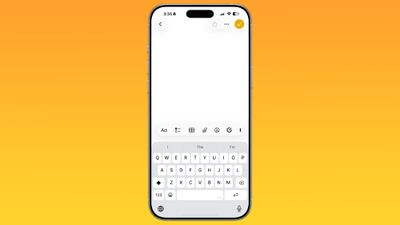
The Notes app’s toolbar has rounded corners and is more compact with a frosted glass look, and the keyboard also has rounded edges. Buttons at the top are circles or pills, with the Liquid Glass effect.
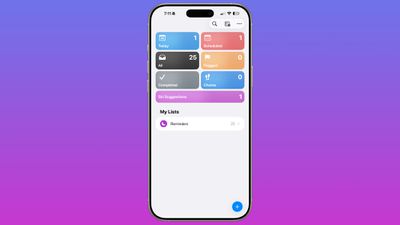
In Reminders, the different inbox sections are full color instead of white, and all of the various buttons are rounder than before with a translucent aesthetic. Interfaces for entering and editing reminders also have the rounded edges that are part of the new design.
Reminders
The changes in the Reminders app go beyond simple design updates, with Apple introducing some useful new AI features. The new Reminders features require a device that supports Apple Intelligence.
Siri Suggestions
Apple added a Siri Suggestions section to the Reminders app, which will bring up items that you might want to add to your to-do lists that are found in conversations in Mail and Messages. Reminders is able to suggest tasks automatically, taking in information from notes, grocery items in a list, and more.
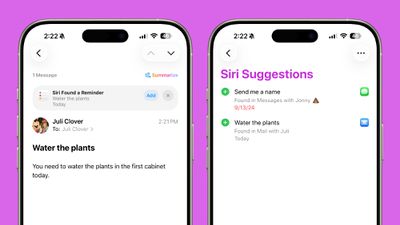
You’ll also see Reminder suggestions in apps like Mail, and you can tap these to add a reminder without opening the Reminders app.
Suggestions for reminders are contextual and personalized to each user, and are designed to make it easier to create reminders with fewer interactions. Apple says users will see suggestions for tasks, grocery items, and follow-ups based on emails and other text on the iPhone.
Automatic Categorization
The Reminders app is able to categorize related tasks into sections that are grouped together. If you need to pick up several items at the grocery store, for example, the Reminders app can aggregate these in one area.
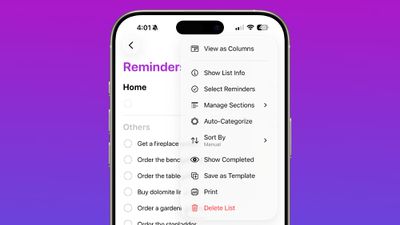
If you have several work tasks and errands to run, the Reminders app is able to separate them out, so you don’t need to spend time manually sorting your lists.
Control Center
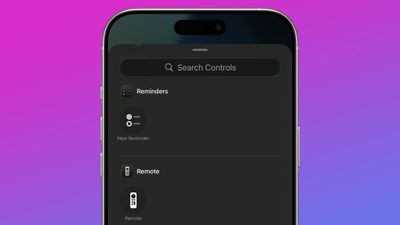
There’s now a Control Center option for creating a new reminder. You can use it from the Control Center, assign it to the Action Button, or access it from the Lock Screen by assigning it to one of the Lock Screen buttons.
Notes
There are fewer updates in the Notes app in iOS 26, but Apple made a couple of changes that will be useful to users.
Math Notes
Math Notes now supports creating 3D graphs using three-variable equations. An equation like z=sin(x2 + y2), for example, will create a ripple graph.
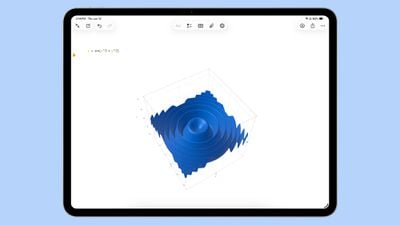
Using this feature can be done by typing in an equation and then tapping on one of the variables. From there, choose the Insert 3D graph option. 3D graphs can be enlarged, resized, and moved using tap and drag gestures.
3D graphs are also supported in iPadOS 26, including with handwritten equations.
Scrolling Toolbar
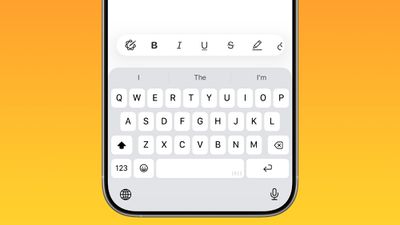
You can now swipe along the toolbar in Notes to see all of the available tool options. Before, you had to tap into a tool section to get to all of the features. Even though swiping is an option to get to more tools, you can still tap to open different submenus for formatting, image generation, lists, tables, and more.
Markdown
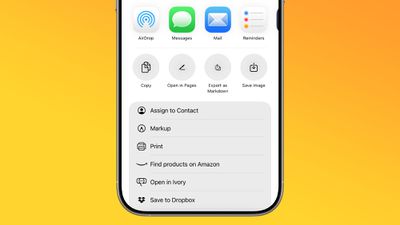
The Notes app supports exporting content in Markdown in iOS 26, so you can save notes as Markdown (.md) files that can be imported into third-party apps that support Markdown. Writing in Markdown is not supported in the Notes app.
Search
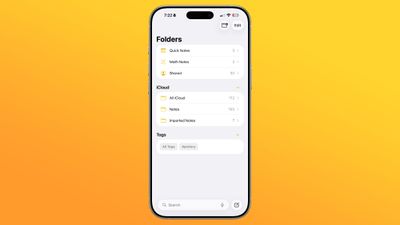
The Folders view of the Notes app now has an always-visible search bar at the bottom rather than a hidden bar that’s accessible with a swipe from the top of the app.
Call Recordings
Conversations from the new Phone app on the iPad and the Mac can be saved as audio recordings with transcriptions in the Notes app. This was previously available on the iPhone in iOS 18, but with the Phone app expanding to new devices, the call recording functionality has expanded as well. Transcriptions require Apple Intelligence.
Read More
We have an iOS 26 roundup that has more information on all of the new features that are available in iOS 26.
Popular Stories
New Apple TV Expected Later This Year With These New Features
A new Apple TV is expected to be released later this year, and a handful of new features and changes have been rumored for the device. Below, we recap what to expect from the next Apple TV, according to rumors. Rumors Faster Wi-Fi Support The next Apple TV will be equipped with Apple’s own combined Wi-Fi and Bluetooth chip, according to Bloomberg’s Mark Gurman. He said the chip supports …
Apple Watch Ultra 3: What to Expect
The long wait for an Apple Watch Ultra 3 is nearly over, and a handful of new features and changes have been rumored for the device. Below, we recap what to expect from the Apple Watch Ultra 3:Satellite connectivity for sending and receiving text messages when Wi-Fi and cellular coverage is unavailable 5G support, up from LTE on the Apple Watch Ultra 2 Likely a wide-angle OLED display that …
iPhone 17 Pro Coming Soon With These 16 New Features
Apple’s next-generation iPhone 17 Pro and iPhone 17 Pro Max are only two months away, and there are plenty of rumors about the devices. Below, we recap key changes rumored for the iPhone 17 Pro models. Latest Rumors These rumors surfaced in June and July:A redesigned Dynamic Island: It has been rumored that all iPhone 17 models will have a redesigned Dynamic Island interface — it might …
5 Reasons to Skip This Year’s iPhone 17 Pro
Thursday July 10, 2025 4:54 am PDT by Tim Hardwick
Apple will launch its new iPhone 17 series in two months, and the iPhone 17 Pro models are expected to get a new design for the rear casing and the camera area. But more significant changes to the lineup are not expected until next year, when the iPhone 18 models arrive. If you’re thinking of trading in your iPhone for this year’s latest, consider the following features rumored to be coming…
Here’s When to Expect the iOS 26 Public Beta
Apple previously announced that a public beta of iOS 26 would be available in July, and now a more specific timeframe has surfaced. Bloomberg’s Mark Gurman today said that Apple’s public betas should be released on or around Wednesday, July 23. In other words, expect the public betas of iOS 26, iPadOS 26, macOS 26, and more to be available at some point next week. Apple will be releasing…
Apple Store Near Sydney Permanently Closing Later This Year
Apple today said its store at the Westfield Hornsby shopping mall, in Hornsby, Australia, will be permanently closing in October. Apple Hornsby In a statement shared with Australian tech news website EFTM (via Reddit), Apple said that it has decided not to renew its lease at Westfield Hornsby. Apple said all affected retail employees will be given the opportunity to work at Apple’s nearby…
Top Stories: iPhone 17 Pro Rumors, iOS 26 Beta 3, and More
The iOS 26 public beta release is quickly approaching, while developers have recently gotten their hands on a third round of betas that has seen Apple continue to tweak features, design, and functionality. We’re also continuing to hear rumors about the iPhone 17 lineup that is now just about right around the corner, while Apple’s latest big-budget film appears to be taking off, so read on…