by Juli Clover
When you’re not using your iPhone, the Lock Screen is what you see most often. Liquid Glass is everywhere in iOS 26, and it starts right when you pick up your device. The Lock Screen got a Liquid Glass overhaul, plus a few other new features.
Here’s what you’ll see first when you upgrade to iOS 26.
Liquid Glass
The two customizable control buttons on the Lock Screen are larger and have a floating, glass-like appearance like the other Liquid Glass interface options in iOS 26. The clock has a frosted glass appearance with the new “Glass” option, using lighting effects to make it look like glass in the real world.
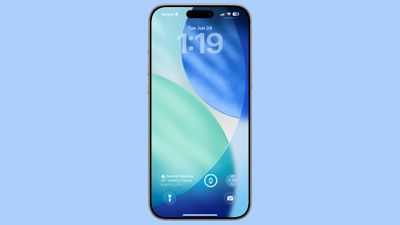
Glass can be selected for any of the clock fonts, and you can choose a color to tint the glass. Apple has multiple preset options, or you can select your own.
When you tilt your iPhone, light reflects and glints with the movement, for a realistic glass effect.
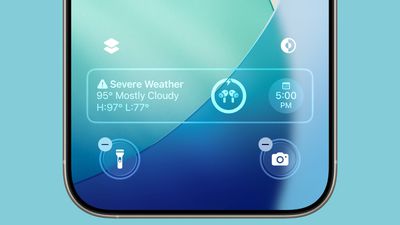
Notifications that are on your Lock Screen have a Liquid Glass aesthetic with a frosted glass look that leaves your wallpaper visible behind them.
Clock
In addition to having a Liquid Glass aesthetic, the clock can be resized to better match your iPhone’s wallpaper using a new adaptive feature. When you’re customizing your Lock Screen, you can grab the corner of the time and drag it down to expand it.
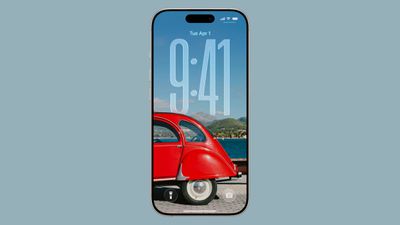
Adjusting the size of the time only works with the first font option, and only with the standard Arabic, Western numbering. 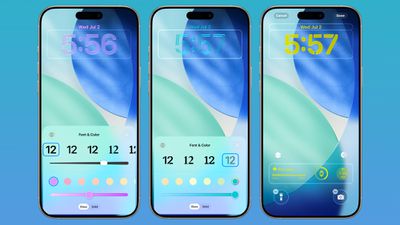
With photo wallpapers, the time can automatically expand to fill in missing space, and it can change based on the image if you have Photo Shuffle set. The subject in photo wallpapers is meant to always be visible, and can overlap the time in unique ways in iOS 26. 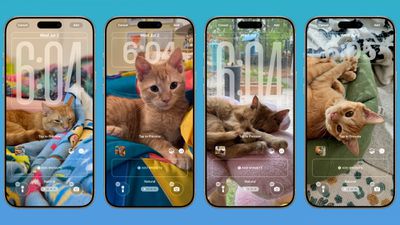
There is a Photos watch face for the Apple Watch that also supports time that changes size and position based on the wallpaper.
Wallpaper
There is a new default wallpaper that was designed for iOS 26. It’s multiple shades of blue, with the same floating glass aesthetic that the rest of iOS 26 features. The wallpaper can subtly shift with iPhone movement.
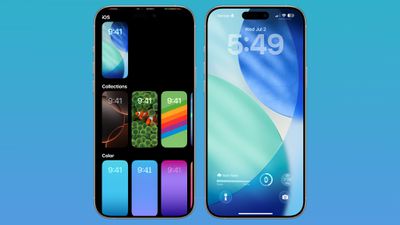
It’s a small detail, but the icons for selecting different wallpaper categories have been updated to better match the Liquid Glass design.
Spatial Scenes
Aside from the Liquid Glass time, Spatial Scenes are the biggest change to the Lock Screen. 2D photos that you set as wallpaper can be turned into 3D spatial images that separate the subject of the photo from the background using depth information.
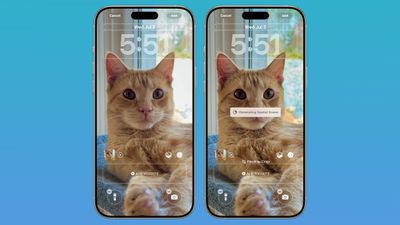
When you move your iPhone, Spatial Scenes shift and move along with it, making the images feel alive. Spatial Scenes is a feature in the Photos app too, and it can be added to any image that you’ve taken with your iPhone, including older ones.
Tap on the small icon with a mountain and a sun to activate the Spatial Scenes setting when choosing a photo wallpaper.
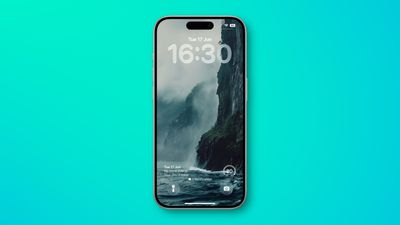
Lock Screen widgets can be placed on the top of the display under the time, or at the bottom of the display. In earlier versions of iOS, you could only put widgets at the top of the screen. With the adaptive clock and new wallpaper options, widgets can also shift down automatically to ensure the subject of an image is always visible.
Apple Music
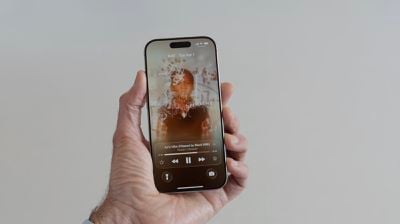
Apple added a new Lock Screen widget for Apple Music search, but there are no other new Lock Screen widget options. What is new, though, is a new full screen Now Playing interface that shows album art. Artwork expands and animates right on the Lock Screen.
Read More
We have a dedicated iOS 26 roundup that goes into detail on all of the new features that are available in the update.
Popular Stories
iPhone 17 Pro Coming Soon With These 14 New Features
Apple’s next-generation iPhone 17 Pro and iPhone 17 Pro Max are less than three months away, and there are plenty of rumors about the devices. Apple is expected to launch the iPhone 17, iPhone 17 Air, iPhone 17 Pro, and iPhone 17 Pro Max in September this year. Below, we recap key changes rumored for the iPhone 17 Pro models:Aluminum frame: iPhone 17 Pro models are rumored to have an…
New MacBook With A18 Pro Chip Spotted in Apple Code
Apple is developing a MacBook with the A18 Pro chip, according to findings in backend code uncovered by MacRumors. Earlier today, Apple analyst Ming-Chi Kuo reported that Apple is planning to launch a low-cost MacBook powered by an iPhone chip. The machine is expected to feature a 13-inch display, the A18 Pro chip, and color options that include silver, blue, pink, and yellow. MacRumors…
Apple Watch Ultra 3 Launching Later This Year With Two Key Upgrades
The long wait for an Apple Watch Ultra 3 appears to be nearly over, and it is rumored to feature both satellite connectivity and 5G support. Apple Watch Ultra’s existing Night Mode In his latest Power On newsletter, Bloomberg’s Mark Gurman said that the Apple Watch Ultra 3 is on track to launch this year with “significant” new features, including satellite connectivity, which would let you…
iPhone 17 Pro’s New MagSafe Design Revealed in Leaked Photo
The upcoming iPhone 17 Pro and iPhone 17 Pro Max are rumored to have a slightly different MagSafe magnet layout compared to existing iPhone models, and a leaked photo has offered a closer look at the supposed new design. The leaker Majin Bu today shared a photo of alleged MagSafe magnet arrays for third-party iPhone 17 Pro cases. On existing iPhone models with MagSafe, the magnets form a…
Apple Planning to Launch Low-Cost MacBook Powered By iPhone Chip
Apple is planning to launch a low-cost MacBook powered by an iPhone chip, according to Apple analyst Ming-Chi Kuo. In an article published on X, Kuo explained that the device will feature a 13-inch display and the A18 Pro chip, making it the first Mac powered by an iPhone chip. The A18 Pro chip debuted in the iPhone 16 Pro last year. To date, all Apple silicon Macs have contained M-series…
Apple Releases Second iOS 18.6 Public Beta
Tuesday July 1, 2025 10:19 am PDT by Juli Clover
Apple today seeded the second betas of upcoming iOS 18.6 and iPadOS 18.6 updates to public beta testers, with the betas coming just a day after Apple provided the betas to developers. Apple has also released a second beta of macOS Sequoia 15.6. Testers who have signed up for beta updates through Apple’s beta site can download iOS 18.6 and iPadOS 18.6 from the Settings app on a compatible…
iOS 26 Adds a Useful New Wi-Fi Feature to Your iPhone
iOS 26 and iPadOS 26 add a smaller yet useful Wi-Fi feature to iPhones and iPads. As spotted by Creative Strategies analyst Max Weinbach, sign-in details for captive Wi-Fi networks are now synced across iPhones and iPads running iOS 26 and iPadOS 26. For example, while Weinbach was staying at a Hilton hotel, his iPhone prompted him to fill in Wi-Fi details from his iPad that was already…
Five Features Coming to AirPods Pro 3
Friday June 27, 2025 10:52 am PDT by Juli Clover
Apple hasn’t updated the AirPods Pro since 2022, and the earbuds are due for a refresh. We’re counting on a new model this year, and we’ve seen several hints of new AirPods tucked away in Apple’s code. Rumors suggest that Apple has some exciting new features planned that will make it worthwhile to upgrade to the latest model. Subscribe to the MacRumors YouTube channel for more videos. Heal…
Apple Music Debuts All-New Personalized Playlist
As part of its 10-year celebrations of Apple Music, Apple today released an all-new personalized playlist that collates your entire listening history. The playlist, called “Replay All Time,” expands on Apple Music’s existing Replay features. Previously, users could only see their top songs for each individual calendar year that they’ve been subscribed to Apple Music, but now, Replay All…