If you’ve just downloaded the iOS 26 public beta on your iPhone, the first thing you’ll notice is the new Liquid Glass design overhaul, which adopts translucent elements throughout the system interface and in stock apps.
On the Home Screen, the search bar, dock, and app folders are translucent. By default, app icons have a new layered glass look that gives them dimension, but there’s also a new option for “Clear” glass-like icons. This setting turns your app icons transparent, and widgets too. So if you want the full glass effect, read on.
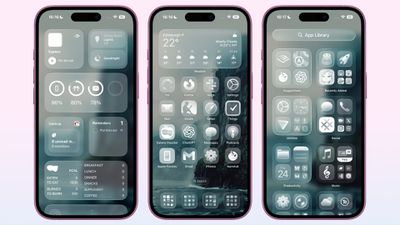
In iOS 18, Apple introduced Dark Mode and Tinted app icons. With iOS 26 and iPadOS 26, Apple adds a third visual style – Clear – that removes the color from app icons and widgets, and applies reflective, translucent effects to make them appear see-through.
There are two versions of the new Clear style. In Light mode, app icons appear semi-transparent, subtly darkening the wallpaper beneath them. Both icons and widgets resemble glass-like panels with layered text and images. In Dark mode, icons retain some transparency but feature a darker background, making them more pronounced while preserving the layered, translucent aesthetic.
Apple also includes an Auto option that dynamically adapts to the Appearance setting of your iPhone.
How to Get Clear App Icons in iOS 26
- On your iPhone’s Home Screen, long press an empty space until it enters jiggle mode.
- Tap Edit in the top-left corner, then tap Customize in the pop-up menu.
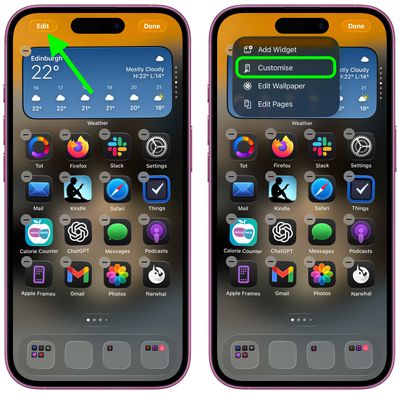
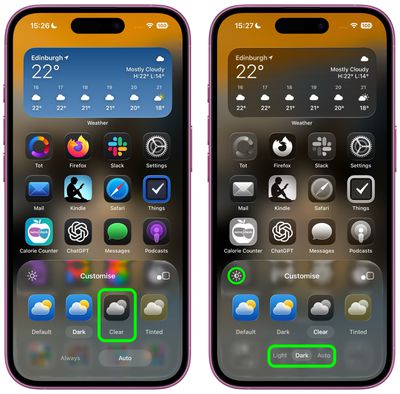
- Select Clear in the panel that appears at the bottom.
- Choose Light, Dark, or Auto mode. If a mode makes icons or app labels hard to see, tap the sun icon in the top-left of the Customize panel to dim the wallpaper.
Accessibility Settings
If legibility is a problem, there are two toggles in Settings ➝ Accessibility ➝ Display & Text Size that impact the look of the Clear style of icons. Try playing with Reduce Transparency and Increase Contrast – just note that toggling on both settings will cause the icons to lose most of their translucency.
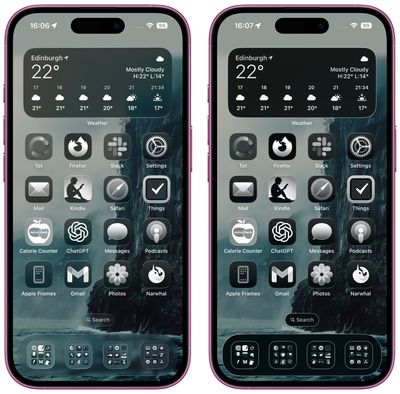
Clear icon style in Dark mode (left) vs. Accessibility setting toggles
Liquid Glass extends to iPadOS 26, macOS 26, watchOS 26, and tvOS 26. iPadOS 26 looks a lot like iOS 26, and macOS 26 has a translucent menu bar and dock background, plus it uses Liquid Glass for buttons, side bars, navigation bars, and the Control Center. What do you think of the new Clear style and the Liquid Glass redesign of iOS 26 more broadly? Let us know in the comments.
Popular Stories
iPhone 17 Pro Launching in Two Months With These 16 New Features
Apple’s iPhone 17 Pro and iPhone 17 Pro Max are less than two months away, and there are plenty of rumors about the devices. Below, we recap key changes rumored for the iPhone 17 Pro models, as of July 2025:Aluminum frame: iPhone 17 Pro models are rumored to have an aluminum frame, whereas the iPhone 15 Pro and iPhone 16 Pro models have a titanium frame, and the iPhone X through iPhone 14…
Foldable iPhone’s Display Sizes Leaked
Apple’s first foldable iPhone will be equipped with a 7.8-inch inner display, and a 5.5-inch outer display, according to Taiwanese research firm TrendForce. Apple supply chain analyst Ming-Chi Kuo already mentioned those same display sizes for the foldable iPhone in March, meaning there are now multiple sources backing those sizes, so long as TrendForce is not simply copying what Kuo said. …
Apple Announces ‘AppleCare One’ Subscription Plan for Multiple Devices
Apple today announced AppleCare One, a new subscription plan for customers to cover multiple devices with a single plan. AppleCare One starts at $19.99 per month for up to three products, with the ability to add more for $5.99 per month for each additional device. The plan incudes all of the benefits that come with AppleCare+, such as unlimited repairs for accidents, priority support,…
Everything New in iOS 26 Beta 4
Tuesday July 22, 2025 3:56 pm PDT by Juli Clover
Apple released the fourth beta of iOS 26 today, and the company has continued making changes to the way that Liquid Glass looks. There are also new features, including the return of Apple Intelligence Notification Summaries for news. This beta is of particular interest because it’s likely the beta that public beta testers will get in the not too distant future. Liquid Glass Changes Liquid…
18 Reasons to Wait for the iPhone 17
Tuesday July 22, 2025 8:10 am PDT by Tim Hardwick
Apple’s iPhone development roadmap runs several years into the future and the company is continually working with suppliers on several successive iPhone models simultaneously, which is why we often get rumored features months ahead of launch. The iPhone 17 series is now less than two months away, so we already have a good idea of what to expect from Apple’s 2025 smartphone lineup. If you…
Apple Improves Liquid Glass in iOS 26 Beta 4, Reversing Some Beta 3 Changes
Tuesday July 22, 2025 11:21 am PDT by Juli Clover
With the fourth beta of iOS 26, Apple has again made changes to the Liquid Glass design that’s available across the operating system, tweaking how the menus and buttons appear in apps. In response to criticism about too little Liquid Glass in beta 3, Apple has upped the translucency in several areas. Beta 4 on left, beta 3 on right Navigation bars in apps like Photos, Music, the App …
iOS 26 Public Beta Appears Imminent Based on This Latest Hint
An anonymous leaker with a proven track record today shared alleged build numbers for the fourth developer betas of iOS 26 and more. The private account on X has accurately leaked build numbers for Apple software updates in the past. We do not link to the account at the owner’s request. Here are all of the build numbers shared by the account today: iOS 26 and iPadOS 26 beta 4 (23A5297i)…