by Juli Clover
Apple doesn’t typically focus much on the Calculator app, but with iOS 18, it’s getting a notable overhaul and some surprising integration with the Notes app.

This guide walks through everything that’s new with the Calculator in iOS 18 (and iPadOS 18).
Math Notes
The biggest change to the Calculator app is the addition of Math Notes, a feature that’s basically an integration between the Calculator and the Notes app.

Math Notes lets you type equations in the Notes app and have them solved automatically when you put in an equals sign. So you can do things like calculate how much everyone owes for a group trip, or split up a dinner bill.
You can do more complex equations too, defining variables and then using those definitions for your calculations. If you write dinner = $57 and movies = $24 in a note, for example, you can then type in “dinner + movies” and add an equals sign and get the total, with the Math Notes feature understanding what you’re referencing.
In Math Notes, your equations are solved automatically wherever you put in an equals sign, as that signals to Apple that you want to solve what you’ve typed.
Math Notes is technically a Notes app feature, but you can in fact start a Math Note in the Calculator app, and use it right there without having to swap over to Notes.
- Open up the Calculator app.
- Tap on the calculator symbol at the bottom left of the app.
- Select Math Notes.
- Tap on the new note symbol at the bottom right of the display.
- Start your calculations.
You can do this same thing directly in the Notes app with any existing or new note. It’s all the same feature, just accessed from different places.
If you’re in a Math Note in the Calculator app and you want to get back to the standard calculator interface, just tap again on the calculator icon and choose the Basic or Scientific option.
Apple says that Math Notes is available for math written using Western Arabic numerals and common mathematical symbols, or typed using Arabic (Eastern & Western) and Devanagari numerals and common mathematical symbols.
Math Notes on iPad
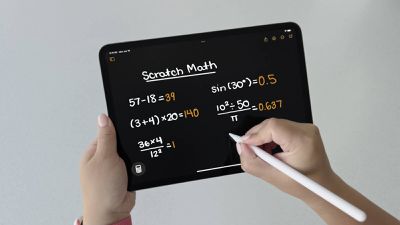
With iPadOS 18, Math Notes works in the same way, but there is an added bonus – you can use the Apple Pencil. Once you start a Math Note from the Calculator app or the Notes app, you can write your equations by hand and have them solved in the exact same way.
Math Notes Everywhere
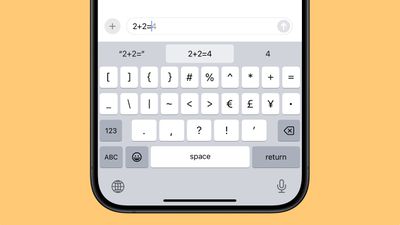
You can in fact get Math Notes results almost anywhere in the operating system. If you type an equation into search, for example, you’ll get a result, and the same goes for apps like Messages.
Unit Conversion
When using Math Notes, you can do unit conversions. Just type in what you want to convert, and you’ll get the result automatically. For example, if you type in 10 kilograms to pounds in the Math Notes interface in the Calculator app, the result is automatically generated.

Unit conversions work in search, Messages, Notes, the Calculator app, and more.
Calculation History
If you open up the Calculator app and tap on the three lines at the upper left of the interface, you can see a history of all of the calculations you have entered into the app. Apple only saves calculations done with the Basic or Scientific calculators here, and Math Notes are saved in the Notes app.

You can long press on any of the calculations to copy either the expression or the result, and if you swipe, you can delete them from the list. You can also tap on the Edit button to select several expressions to delete, or use the Delete All option from this menu to clear out the app.
Portrait Orientation
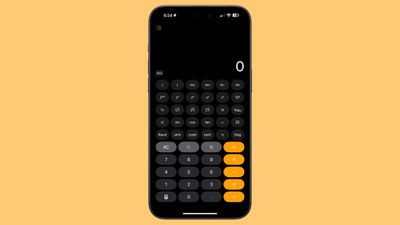
There is now an option to use the scientific calculator in portrait orientation, so you don’t need to turn your iPhone to landscape orientation to get to it anymore.
Read More
Additional information on new features that Apple has added in iOS 18 can be found in our iOS 18 roundup.
Popular Stories
iPhone 17 Lineup Specs Detail Display Upgrade and New High-End Model
Key details about the overall specifications of the iPhone 17 lineup have been shared by the leaker known as “Ice Universe,” clarifying several important aspects of next year’s devices. Reports in recent months have converged in agreement that Apple will discontinue the “Plus” iPhone model in 2025 while introducing an all-new iPhone 17 “Slim” model as an even more high-end option sitting…
iPhone SE 4 Production Will Reportedly Begin Ramping Up in October
Following nearly two years of rumors about a fourth-generation iPhone SE, The Information today reported that Apple suppliers are finally planning to begin ramping up mass production of the device in October of this year. If accurate, that timeframe would mean that the next iPhone SE would not be announced alongside the iPhone 16 series in September, as expected. Instead, the report…
These 5 Features Will Make the iPhone 17 the Biggest Update in Years
Monday July 22, 2024 4:02 pm PDT by Juli Clover
The upcoming iPhone 16 models that we’re expecting to see in September are going to be quite similar to the iPhone 15 models, but rumors suggest that Apple is making big changes in 2025. We’ve been hearing hints of an all-new device in the iPhone lineup, and it may be the most expensive iPhone Apple has offered to date. New ‘Slim’ Design Rumors have taken to referring to the new iPhone 17…
Apple TV+ Curbs Costs After Expensive Projects Fail to Capture Viewers
Apple is scaling back its Hollywood spending after investing over $20 billion in original programming with limited success, Bloomberg reports. This shift comes after the streaming service, which launched in 2019, struggled to capture a significant share of the market, accounting for only 0.2% of TV viewership in the U.S., compared to Netflix’s 8%. Despite heavy investment, critical acclaim,…
iPhone SE 4 Rumored to Launch Early Next Year With OLED Display, 48MP Camera, and More
The fourth-generation iPhone SE will offer a series of major upgrades over the current model, the leaker known as “Ice Universe” claims. The information was listed in a post on Weibo, which also detailed the specifications of the iPhone 17 lineup. As previously rumored, the fourth-generation iPhone SE is expected to feature Face ID and USB-C, marking a major upgrade from current and previous …
Microsoft Blames European Commission for Major Worldwide Outage
Monday July 22, 2024 11:55 am PDT by Juli Clover
Last Friday, a major CrowdStrike outage impacted PCs running Microsoft Windows, causing worldwide issues affecting airlines, retailers, banks, hospitals, rail networks, and more. Computers were stuck in continuous recovery loops, rendering them unusable. The failure was caused by an update to the CrowdStrike Falcon antivirus software that auto-installed on Windows 10 PCs, but Mac and Linux…
Everything New in iOS 18 Beta 4
Tuesday July 23, 2024 1:08 pm PDT by Juli Clover
Apple released the fourth beta of iOS 18 today, introducing small changes to a number of features throughout the operating system. There are no big additions in this beta, but Apple is continuing to refine existing settings and design choices. Apple plans to continue updating iOS 18 over the next few months, with the update set to be released this fall. We’ve rounded up all of the changes…