by Juli Clover
Visual Intelligence, an Apple Intelligence feature that Apple introduced last year, has some new capabilities in iOS 26 that make it more useful and better able to compete with the functionality available through some Android smartphones.
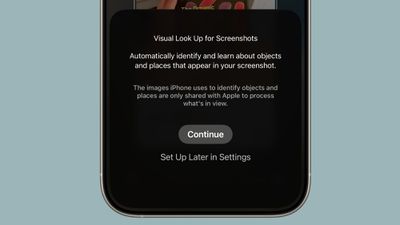
Onscreen Awareness
In iOS 18, Visual Intelligence only works with the camera, but in iOS 26, it also works with what’s on your device. You can capture a screenshot of what’s on your screen and then use Visual Intelligence on it to identify what you’re looking at, find images, and get more information through ChatGPT.
How to Get Use Onscreen Awareness for Visual Intelligence
Visual Intelligence for screenshots works about the same as Visual Intelligence with the camera app, but it’s located in the screenshot interface. Take a screenshot (hold down the volume up button and the side button), and then tap out of the Markup interface if it’s showing.
To get out of Markup (which is the default view), tap on the little pen icon at the top of the display. From there, you should see the Visual Intelligence options.
Highlight to Search
With Highlight to Search for Visual Intelligence onscreen content awareness, you can use a finger to draw over the object in the screenshot that you want to look up. It’s similar to Android’s Circle to Search feature.
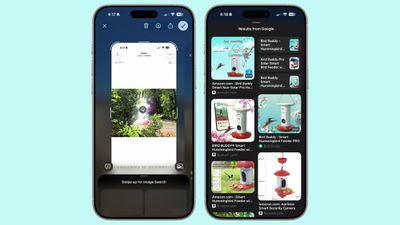
Highlight to Search lets you conduct an image search for a specific object in a screenshot, even if there are multiple things in the picture. It uses Google Image search by default, but Apple showed off the feature working with other apps like Etsy during its keynote event. Apps will likely need to add support for the feature.
In some cases, Visual Intelligence will identify individual objects in an image on its own, and you can tap without needing to use Highlight to Search. This is similar to the object identification feature in the Photos app, but it still leads to an image search.
Ask and Search
If you don’t need to isolate one object in your screenshot, you can simply tap on the Ask button to ask questions about what you’re seeing. Questions will be relayed to ChatGPT, and ChatGPT will provide the information. The Search button queries Google Search for more information.
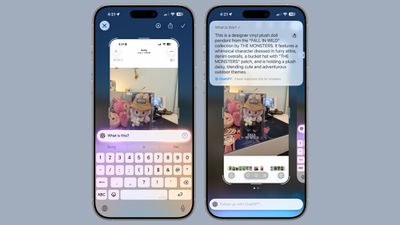
As with the standard Visual Search, if your screenshot includes dates, times, and related information for an event, it can be added directly to your calendar.
New Object Identification
Apple didn’t mention it, but Visual Intelligence adds support for quick identification of new types of objects. It can now identify art, books, landmarks, natural landmarks, and sculptures, in addition to the animals and plants it was able to provide information on before.
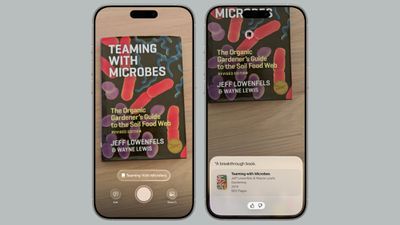
If you use Visual Intelligence on an object that it is able to recognize, you’ll see a small glowing icon pop up. Tapping on it reveals information about what’s in view. What’s neat about this aspect of Visual Intelligence is that it works with the live camera view or with a snapped photo.
For standard Ask and Search requests using Visual Intelligence, you have to take a photo so that it can be relayed to sources like ChatGPT or Google Image Search. Art, books, landmarks, natural landmarks, sculptures, plants, and animals can be identified on-device without contacting another service.
Compatibility
Visual Intelligence is limited to devices that support Apple Intelligence, which includes the iPhone 15 Pro models and the iPhone 16 models. It is activated by a long press on the Camera Control button on devices that have Camera Control, or using the Action Button or a Control Center toggle.
Launch Date
iOS 26 is in beta testing right now, but it will launch to the public in September.
Popular Stories
17 Reasons to Wait for the iPhone 17
Thursday June 12, 2025 8:58 am PDT by Tim Hardwick
Apple’s iPhone development roadmap runs several years into the future and the company is continually working with suppliers on several successive iPhone models simultaneously, which is why we often get rumored features months ahead of launch. The iPhone 17 series is no different, and we already have a good idea of what to expect from Apple’s 2025 smartphone lineup. If you skipped the iPhone…
Apple Explains Why iPads Don’t Just Run macOS
iPadOS 26 allows iPads to function much more like Macs, with a new app windowing system, a swipe-down menu bar at the top of the screen, and more. However, Apple has stopped short of allowing iPads to run macOS, and it has now explained why. In an interview this week with Swiss tech journalist Rafael Zeier, Apple’s software engineering chief Craig Federighi said that iPadOS 26’s new Mac-like …
Here Are All the iOS 26 Features That Require iPhone 15 Pro or Newer
Thursday June 12, 2025 4:53 am PDT by Tim Hardwick
With iOS 26, Apple has introduced some major changes to the iPhone experience, headlined by the new Liquid Glass redesign that’s available across all compatible devices. However, several of the update’s features are exclusive to iPhone 15 Pro and iPhone 16 models, since they rely on Apple Intelligence. The following features are powered by on-device large language models and machine…
Apple ‘Sherlocked’ These Apps at WWDC 2025
Wednesday June 11, 2025 7:14 am PDT by Tim Hardwick
Apple at WWDC previewed a bunch of new features coming in its updated operating systems, but certain changes will have been met with dismay by third-party developers who already offer apps with equivalent or similar features. In other words, their product has been “sherlocked” by Apple. When Apple creates an app or a feature that has functionality found in a third-party app, it is referred…
Hate iOS 26’s Liquid Glass Design? Here’s How to Tone It Down
Wednesday June 11, 2025 4:22 pm PDT by Juli Clover
iOS 26 features a whole new design material that Apple calls Liquid Glass, with a focus on transparency that lets the content on your display shine through the controls. If you’re not a fan of the look, or are having trouble with readability, there is a step that you can take to make things more opaque without entirely losing out on the new look. Apple has multiple Accessibility options that …
Everything Apple Announced at WWDC 2025 in 10 Minutes
Monday June 9, 2025 5:21 pm PDT by Juli Clover
At today’s WWDC 2025 keynote event, Apple unveiled a new design that will inform the next decade of iOS, iPadOS, and macOS development, so needless to say, it was a busy day. Apple also unveiled a ton of new features for the iPhone, an overhauled Spotlight interface for the Mac, and a ton of updates that make the iPad more like a Mac than ever before. Subscribe to the MacRumors YouTube channel …
Apple to Let iPhone Users Watch Videos on CarPlay Screen While Parked
Apple this week announced that iPhone users will soon be able to watch videos right on the CarPlay screen in supported vehicles. iPhone users will be able to wirelessly stream videos to the CarPlay screen using AirPlay, according to Apple. For safety reasons, video playback will only be available when the vehicle is parked, to prevent distracted driving. The connected iPhone will be able to…
Apple Lists 10 Airlines Set to Offer iOS 26’s Upgraded Boarding Passes
Wednesday June 11, 2025 11:28 am PDT by Joe Rossignol
As we previously reported, iOS 26 enhances Apple Wallet app boarding passes in a few ways. First, the passes now support Live Activities, allowing you to keep track of a flight at a glance on your iPhone’s Lock Screen, and in the Dynamic Island on the iPhone 14 Pro and newer. In addition, new shortcuts below the passes provide one-tap access to Apple Maps for airport directions, and to the Find…