by Juli Clover
Image Playground is Apple’s image generation app that launched last year. Most people may not have a lot of use for the cartoonish images that it produces in iOS 18, but you’re going to want to take another look at it in iOS 26 because Apple has improved its algorithms.

People look more natural in the images generated by the app, with more realistic eyes and more variation in hair that better matches sample photos.
As a quick recap, Image Playground lets you type in any phrase to generate an image in one of three non-realistic styles. You can also select pre-determined scenes and props that Apple suggests, and generate images featuring your friends and family. It’s these images where you will see the biggest difference in iOS 26, because the content generated based on images of people has changed quite a bit.
Animation
In iOS 18, photos generated using the Animation style have blunt hair with little variation, lots of contrast, and unnatural looking faces, but in iOS 26, features are softer, hair is more varied, and it has more flow. Clothes also look more natural, though Image Playground doesn’t often bother matching outfits.
 iOS 18.6 image in middle, iOS 26 image on right
Image Playground’s Animation style in iOS 26 seems to take more liberty with image backgrounds, pose, and body shape, and it’s better at small details like specific eyebrow shape.
 iOS 18.6 image in middle, iOS 26 image on right
Sketch
With the Sketch style, Image Playground is again better at matching facial expression, features, and hair style. The image on the right looks more like MacRumors videographer Dan Barbera than the middle image.
 iOS 18.6 image in middle, iOS 26 image on right
Illustration
Illustration has some of the same characteristics as Sketch, better capturing colors and inventing better backgrounds.
 iOS 18.6 image in middle, iOS 26 image on right
Animals and Landscapes
The changes to Image Playground can also be seen in images of animals, food, places, and more, in all three built-in styles.
 iOS 18.6 image in middle, iOS 26 image on right
Emotions
Image Playground seems to be better at reflecting emotion, too. For this image, the modifier “sobbing” was added to the image. It didn’t quite show tears, but there is more emotion in the iOS 26 face on the right. There’s even a dedicated “Expressions” menu, with options that include laugh, happy, mad, sad, shocked, thinking, thumbs up, and thumbs down.
 iOS 18.6 image in middle, iOS 26 image on right
ChatGPT Integration
ChatGPT image generation capabilities are included in Image Playground in iOS 26, so there are an expanded range of styles to choose from. There are a few suggested options, including anime, oil painting, vector, print, and water color styles, all of which use ChatGPT rather than Apple’s capabilities to create the image.
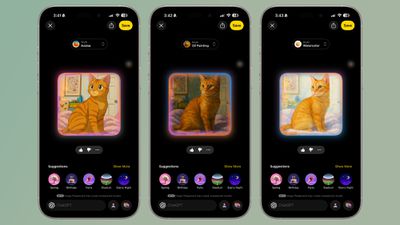 Anime, oil painting, and water color styles in Image Playground
The output is similar to what you get if you use ChatGPT 4o for image generation, and you can make those cute anime-style images that have been floating around the internet.
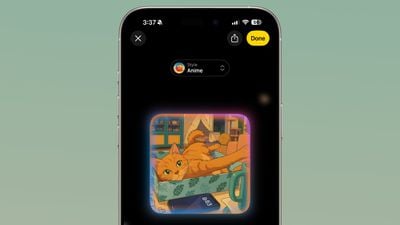 ChatGPT’s anime-style output in Image Playground
There’s also an open-ended “Any Style” option to create images with ChatGPT, and that adds more range to what’s possible with Image Playground. ChatGPT can essentially mimic any style that you ask it to, and it can generate realistic images, which is not something that Apple’s image generation technology does.
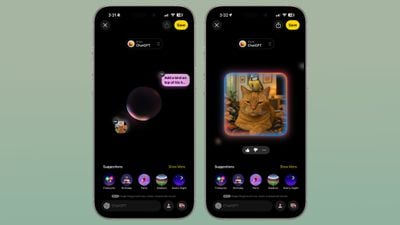 A “realistic” image of a bird on top of a cat’s head.
As with standard Image Playground image generation, you can make a text-based request or upload an image to ChatGPT and ask it to use that as the basis for an image. Images that you upload and text requests can be combined.
Creating images with ChatGPT uses up tokens, and if you have a free account, you probably won’t be able to create more than one or two images. Taking advantage of ChatGPT image creation features in Image Playground beyond that requires a paid account.
Genmoji
Image Playground in iOS 18 does not support creating Genmoji, and that’s a separate feature located in the Messages app. In iOS 26, you can use Image Playground for Genmoji.
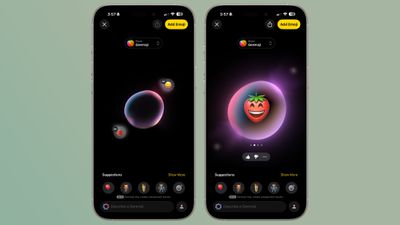
Genmoji is a style that you can select, and choosing it opens up an interface where you can choose an emoji or multiple emoji to customize. One of the new Genmoji features in iOS 26 is the option to combine emoji to make new emoji rather than starting from scratch with a character, and this capability is available in Image Playground in addition to the Messages app.
You can tap multiple emoji to create a new one, or choose an emoji and then add text-based descriptions to make tweaks. There is no option to use photos for Genmoji. The Genmoji that you make are added to your emoji keyboard and they can be used in Messages.
Labeling
When you send someone an image generated with Image Playground in iOS 26, like over AirDrop, it is labeled as a generated image in the file name.
Popular Stories
iPhone 17 Pro Launching in Three Months With These 12 New Features
The iPhone 17 Pro and iPhone 17 Pro Max are around three months away, and there are plenty of rumors about the devices from credible sources. Below, we recap key changes rumored for the iPhone 17 Pro models as of June 2025:Aluminum frame: iPhone 17 Pro models are rumored to have an aluminum frame, whereas the iPhone 15 Pro and iPhone 16 Pro models have a titanium frame, and the iPhone X…
iOS 26’s New Battery Life Mode Available Only on These iPhone Models
Last week, we reported that iOS 26 introduces an opt-in Adaptive Power Mode on the iPhone, alongside the existing Low Power Mode. Apple says that Adaptive Power Mode can make “small performance adjustments” when necessary to extend an iPhone’s battery life, including slightly lowering the display brightness or allowing some activities to “take a little longer.” The full description of…
iPhone Reportedly Moving to All-Screen Design in Two Stages
Apple has long been working towards an iPhone with an all-screen design, and it might finally achieve the feat in a few more years from now. In his Power On newsletter today, Bloomberg’s Mark Gurman said that Apple will shrink the size of the Dynamic Island on new iPhone models released next year. A year after that, he expects Apple to release a redesigned 20th-anniversary iPhone model….
Everything New in iOS 26 Beta 2
Monday June 23, 2025 2:57 pm PDT by Juli Clover
Apple provided developers with the second beta of iOS 26, introducing the first changes and refinements to the new operating system since it debuted after the WWDC keynote. Because we’re early in the beta testing process, there are quite a few tweaks to iOS 26, which we’ve rounded up below. Subscribe to the MacRumors YouTube channel for more videos. Control Center The background behind the…
iOS 26 Beta 2 Fixes Control Center Design
Monday June 23, 2025 10:58 am PDT by Juli Clover
With the second beta of iOS 26 that Apple provided to developers today, Apple addressed one of the major complaints that people have had with Liquid Glass. iOS 26 beta 1 on left, iOS 26 beta 2 on right The Control Center buttons are now slightly more opaque, making it easier to see the different control options even on a multicolored background. The new, more opaque look is apparent with the …
iPhone 17 Pro’s Alleged Vapor Chamber Cooling System Partly Revealed
Apple’s upcoming iPhone 17 Pro and iPhone 17 Pro Max models are rumored to be equipped with a vapor chamber cooling system, and a leaker known as Majin Bu today shared a photo of an alleged copper thermal plate for the system. Many high-end Android smartphones like Samsung’s Galaxy S25 Ultra are equipped with a vapor chamber cooling system, which can manage heat dissipation inside the…
Apple Watch Ultra 3 Finally Coming After Two-Year Hiatus
Tuesday June 24, 2025 3:40 am PDT by Tim Hardwick
Apple will finally deliver the Apple Watch Ultra 3 sometime this year, according to analyst Jeff Pu of GF Securities Hong Kong (via @jukanlosreve). The analyst expects both the Apple Watch Series 11 and Apple Watch Ultra 3 to arrive this year (likely alongside the new iPhone 17 lineup, if previous launches are anything to go by), according to his latest product roadmap shared with…
watchOS 26 Adding a Smaller Yet Useful New Watch Face Setting
watchOS 26 is adding a new “Show Data When Locked” setting to the Apple Watch. MacRumors contributor Steve Moser discovered the new setting within the code for the first watchOS 26 beta, and a Reddit user has seemingly found it in action, but we have yet to figure out where it is exactly. Leave a comment if you know. The new privacy setting allows you to toggle on or off the ability to…
iOS 26 Adding Two New Wi-Fi Features, Allows AirDrop and AirPlay Alternatives
iOS 26 is gaining two new Wi-Fi features, including Captive Assist and Wi-Fi Aware. MacRumors contributor Aaron Perris discovered a reference to Captive Assist within the code for the first iOS 26 developer beta, but Apple has yet to enable the feature. It should be available by the time the software update is released later this year. In his Power On newsletter last month, Bloomberg’s…