by Juli Clover
iOS 26 features a whole new design material that Apple calls Liquid Glass, with a focus on transparency that lets the content on your display shine through the controls. If you’re not a fan of the look, or are having trouble with readability, there is a step that you can take to make things more opaque without entirely losing out on the new look.
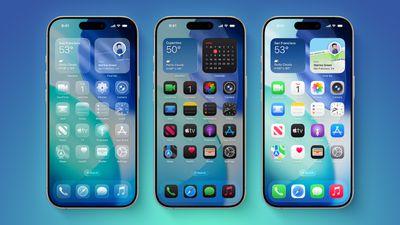
Apple has multiple Accessibility options that are designed to customize iOS for different visual needs, and one of these options is Reduce Transparency. Toggling on Reduce Transparency adds a darker background to translucent areas like the Control Center, app icons, and app folders, improving contrast.
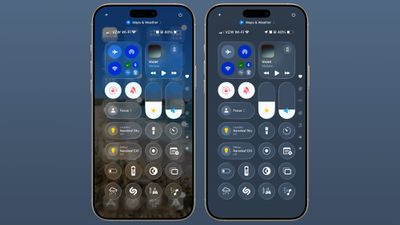
You can turn on Reduce Transparency by opening up the Settings app, going to Accessibility, selecting Display and Text Size, and tapping on the Reduce Transparency toggle. If you want to be able to turn the setting on and off quickly, you can add it to your Accessibility Shortcuts to get to it from the Control center interface. 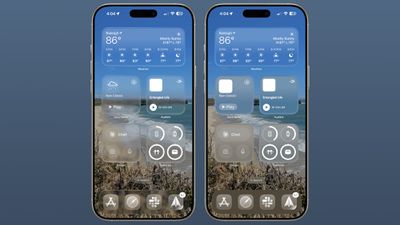
Activating Reduce Transparency does not remove all translucency from the iPhone‘s interface, but it does give everything more of an opaque look. It does not change the shape of buttons or return things to a pre-iOS 26 look. 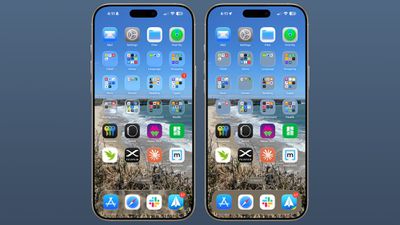
We’re still very early in the beta testing process, and Apple will make tweaks and refinements to the Liquid Glass design based on user feedback. It’s always tough to get used to an entirely new interface, so if you’re a developer running the beta and you’re having trouble adjusting or reading some text, temporarily activating Reduce Transparency might help ease the transition. 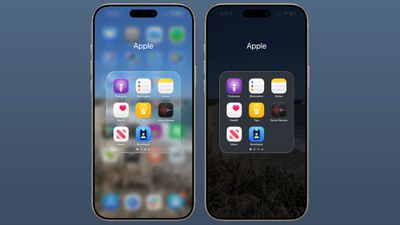
In all likelihood, most people will adjust to the updated Liquid Glass design within a few days. Apple hasn’t made significant changes to app interfaces and layouts, so even though there’s a whole new look for iOS 26, Apple says it’s still going to feel familiar to people.
Liquid Glass could look different by the time that iOS 26 launches to the public, and we’ll see it evolve over the next few months. Right now, iOS 26 is limited to developers, but a public beta is coming in July. A launch will follow in September.
Popular Stories
WWDC 2025 Apple Event Live Keynote Coverage: iOS 26, macOS Tahoe, and More
Apple’s Worldwide Developers Conference (WWDC) starts today with the traditional keynote kicking things off at 10:00 a.m. Pacific Time. MacRumors is on hand for the event and we’ll be sharing details and our thoughts throughout the day. We’re expecting to see a number of software-related announcements led by a design revamp across Apple’s platforms that will also see the numbering of all of…
Everything Apple Announced at WWDC 2025 in 9 Minutes
Monday June 9, 2025 5:21 pm PDT by Juli Clover
At today’s WWDC 2025 keynote event, Apple unveiled a new design that will inform the next decade of iOS, iPadOS, and macOS development, so needless to say, it was a busy day. Apple also unveiled a ton of new features for the iPhone, an overhauled Spotlight interface for the Mac, and a ton of updates that make the iPad more like a Mac than ever before. Subscribe to the MacRumors YouTube channel …
Apple Announces All-New ‘Liquid Glass’ Software Redesign Across iOS 26 and More
Apple today announced a complete redesign of all of its major software platforms called “Liquid Glass.” Announced simultaneously for iOS, iPadOS, macOS, watchOS, tvOS, visionOS, and CarPlay, Liquid Glass forms a new universal design language for the first time. At its WWDC 2025 keynote address, Apple’s software chief Craig Federighi said “Apple Silicon has become dramatically more powerful…
Apple Says iPadOS 26 is Compatible With These iPad Models
Apple today announced that iPadOS 26 will be compatible with the iPad models listed below. iPadOS 26 features a new Liquid Glass design, a menu bar, improved app windowing, and more. iPadOS 26 supports the following iPad models:iPad Pro (M4) iPad Pro 12.9-inch (3rd generation and later) iPad Pro 11-inch (1st generation and later) iPad Air (M2 and later) iPad Air (3rd generation and…
Apple Says These 13 Vehicle Brands Will Soon Offer iPhone Car Keys
In 2020, Apple added a digital car key feature to its Wallet app, allowing users to lock, unlock, and start a compatible vehicle with an iPhone or Apple Watch. The feature is currently offered by select automakers, including Audi, BMW, Hyundai, Kia, Genesis, Mercedes-Benz, Volvo, and a handful of others, and it is set to expand further. During its WWDC 2025 keynote today, Apple said that 13…